🎉 Exciting News from MyRepublic! 🎉
We're thrilled to introduce our new 3Gbps fibre plans! 🚀
To help you get the most out of these lightning-fast plans and understand all their awesome features and benefits, check out our quick reference guide below. It’s packed with answers to your FAQs about our 3Gbps broadband plans. 📚✨
For better optimisation of a 3Gbps broadband connectivity, you may like to consider:
2.5Gbps router (such as one of the following options currently available as part of our bundle - TP-Link BE230, TP-Link BE25, ASUS TUF-AX6000, ASUS GT-AX11000 Pro)
10Gbps router
2.5Gbps or 10Gbps adapter or PCIE (peripheral component interconnect express) port if you wish to optimise the 3Gbps broadband connectivity
Note: the speed is dependent on your choice of adapter or PCIE (peripheral component interconnect express) port.
For better Wi-Fi optimisation on your 3Gbps, you may want to consider getting a Wi-Fi 7 compatible router (instead of a Wi-Fi 6 router). Kindly note that if you have opted for a 1Gbps router, you will only be able to receive up to 1Gbps on your 3Gbps broadband connectivity.
Your Home Voice number will remain the same after upgrading to 3Gbps.
Do note that there may be a change to your Static IP if you are changing from
1Gbps Ultra / 2Gbps Ultra to GAMER 3Gbps
1Gbps GAMER / 2Gbps GAMER to 3Gbps Ultra
Otherwise your Static IP under the current subscription will remain the same after you upgrade to 3Gbps
As our 3Gbps plan is a single-line plan, your second fibre line will no longer be active after upgrading to 3Gbps. But no worries. Everyone at home will have an extra 50% bandwidth than before if you sign up on 3Gbps with a 2.5Gbps router!
Yes, as this is new technology, our technicians will need to install a new ONT and router (ONT installation is applicable for those who sign up under 3Gbps No-Frills plans) to ensure your broadband connectivity is ready or future-proof for 3Gbps speed.
When upgrading to a 3Gbps plan, a modem swap is necessary because the 3Gbps network operates differently from the 1Gbps network. This requires a technician visit to complete the installation.
Devices and equipment will be setup and installed by our dedicated technician during the MyRepublic service installation appointment for new customers. On-site tech support and maintenance service is available, if required, for existing customers.
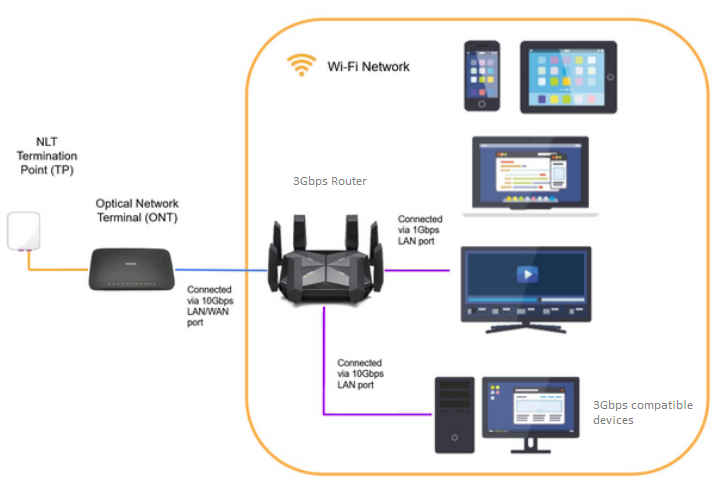
Description: The image above displays the device setup for 10Gbps broadband service.
Upon the installation of the broadband service, our customers may expect the following typical speeds based on their subscription:
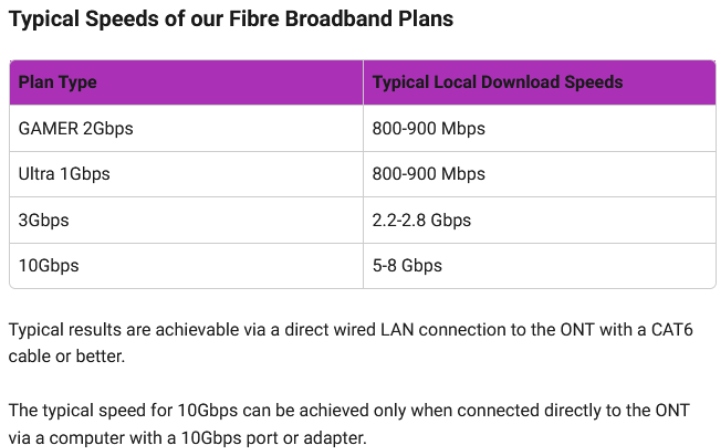
Description: The image above displays the typical speeds for our broadband service.
LAN cables, LAN ports or PCIe cards on your computer, routers, hard disk or the computer itself may affect your internet speed. These are usually the main reason why typical speeds end up being lower than advertised speeds.
We also have some basic troubleshooting steps available to get the best performance out of your broadband plan.
Should further assistance be required, we have the MyRepublic Mobile App, self-help articles, as well customer support in different communication channels ready to help!