To roam with ease while you travel, you will need to activate your roaming service both from the Mobile App and your device. Next, subscribe to our roaming plans based on the data and length of service you require. 🌏📱
Here's how to check if you are subscribed to any of our Travel Boosters on the Mobile App in a few simple steps:
Login to the MyRepublic Mobile App 🔑
From the landing page, tap on "Manage Roaming" 🌐
Check your subscription under "Currently Subscribed" 📶
Another way is from the landing page, tap on "See Everything I Have"
The next page will display your current subscription for local and roaming data under "What You Have"
Stay connected and enjoy your travels! ✈✨
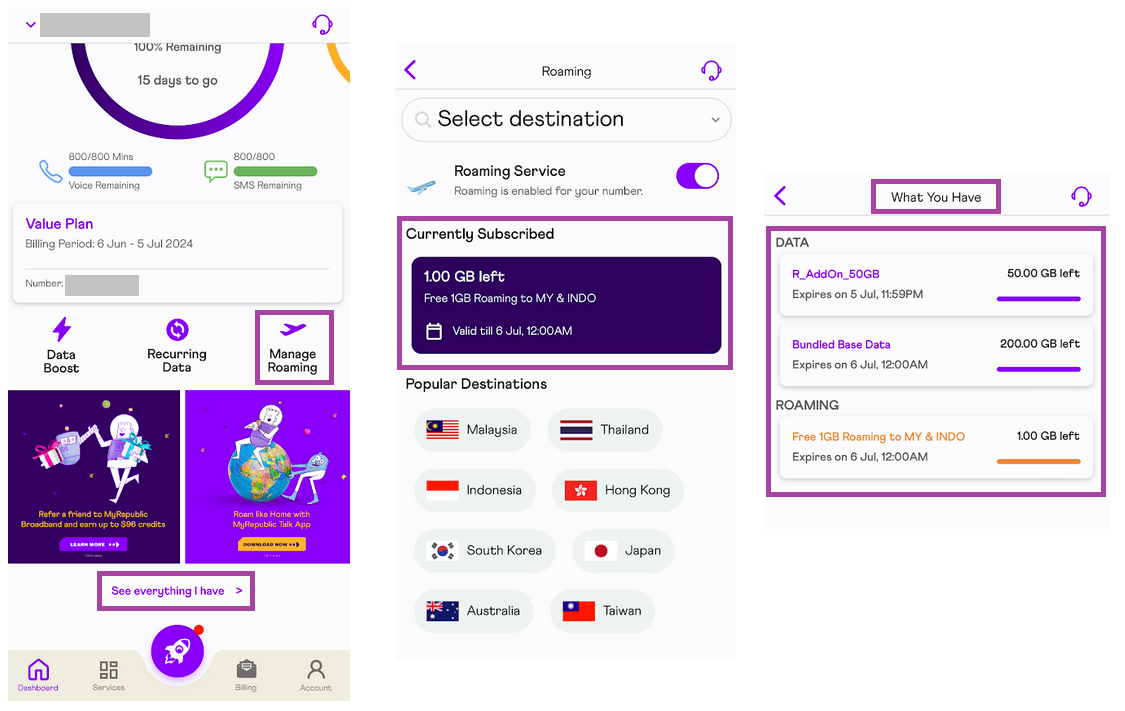
Description: The image above shows the MyRepublic Mobile App where the customer can check their Travel Booster subscription.


Auto-renew feature will need to be turned off when roaming service is no longer required to avoid the automatic renewal of the Travel Booster upon the return to Singapore.