You may refer to our quick guide below if you are not able to call, SMS or use any data during roaming.
1. Have you purchased our data roaming add-ons?
Data roaming will not work if you did not purchase any add-ons
For more info on our data roaming add-ons, you can view it on our mobile app or log on to our website for more info.
2. Check that you have enabled roaming on both our mobile app and on your phone
To activate data roaming on your phone: Go to phone's settings and turn on data roaming
To activate roaming on your mobile app: Click "CUSTOMISE MY ROAMING" > Toggle roaming service on or off
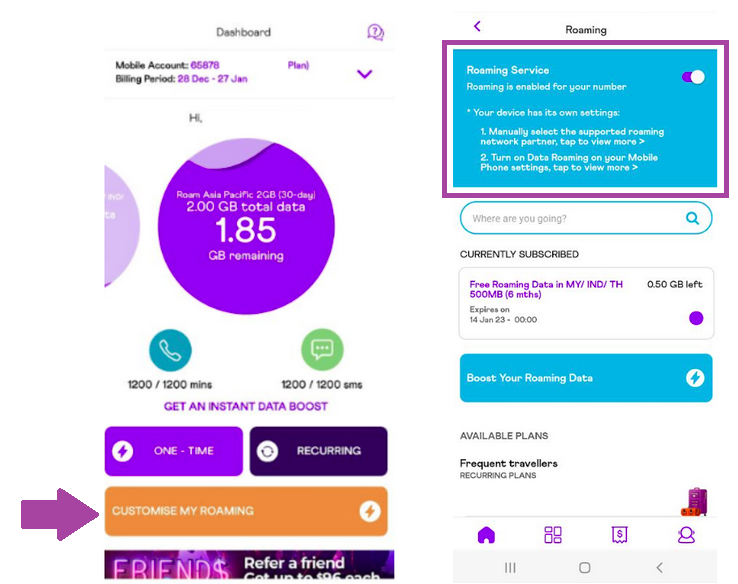
Description: The image above shows the MyRepublic Mobile App landing interface where the customer can enable/disable their roaming service.
3. Make sure that you are on our supporting roaming partner's network
Do choose the network provider manually* on your phone to make sure that you are on MyRepublic supported network, a list of 4G supported roaming partner's network can be found here For 5G supported roaming partner's network can be found here.
If you are not able to hook on to any roaming network, refer to our troubleshooting page here
You may also try to toggle in between the different roaming partner's network to see which has the strongest connection

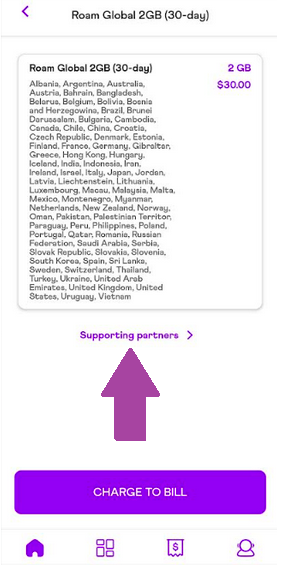
Description: The image above shows the MyRepublic Mobile App listing of our Roaming Partners.
4. If you are not able to call/SMS, check if you have enabled any call forwarding/ barring or have blocked any numbers on your phone
5. If all else fail, perform a Network Reset on your phone
IOS (Apple) - Settings > General > Reset > Reset Network Settings
Huawei - Settings > System > Reset > Network Settings Reset
Samsung - Settings > General Management > Reset > Reset Network Settings
Sony - Settings > Wireless and Networks > More > Network Settings Reset

If you are still not able to roam, you can contact our customer support.